

Description
Download Space Tornado Renamer – Free Bulk File Renaming Tool for Windows, Mac, Android & iOS
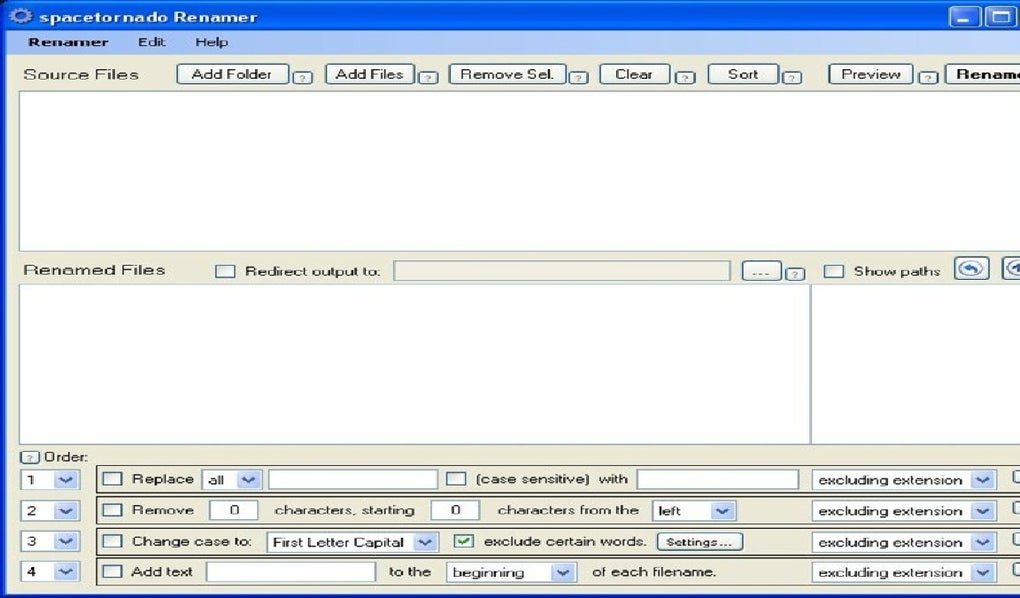
Space Tornado Renamer is a powerful, secure, and user-friendly software designed to simplify bulk file renaming on Windows, Mac, Android, and iOS devices. Whether you're managing a large collection of photos, documents, or media files, this tool streamlines the renaming process with precision and speed. With its intuitive four-step workflow—replace, remove, case adjust, and append—users can customize file names based on specific criteria. The software supports drag-and-drop functionality, real-time previews, and the ability to undo recent changes, making it ideal for both beginners and advanced users. Space Tornado Renamer is free to download and update regularly, ensuring compatibility with the latest operating systems. It’s a must-have utility for anyone looking to organize digital files efficiently.
Key Features of Space Tornado Renamer
Space Tornado Renamer stands out in the crowded file management space thanks to its robust feature set tailored for efficient bulk renaming. One of its most powerful aspects is the customizable four-step renaming process. First, users can replace specific words or phrases across multiple files—perfect for standardizing file names after a project or event. For example, replacing "IMG_001" with "Vacation2024" across hundreds of photos. Second, the tool allows for the removal of unwanted characters such as underscores, brackets, or special symbols, ensuring clean and consistent naming. Third, the case modification feature lets users convert names to uppercase, lowercase, or title case, which is especially helpful when preparing files for professional use or web publishing. Fourth, the append function enables users to add prefixes or suffixes at any position in the filename, such as adding "_final" or the date of creation.
Another standout feature is the real-time preview window, which shows how files will be renamed before applying changes. This prevents accidental misnaming and gives users confidence in their edits. The software also supports drag-and-drop functionality, allowing users to quickly add files or folders to the interface without navigating through menus. Additionally, Space Tornado Renamer includes an undo option, so if a renaming operation goes wrong, you can revert to the previous state. The tool is lightweight and doesn’t consume excessive system resources, making it suitable for older devices. Whether you're a photographer organizing image folders, a student managing research files, or a business professional preparing reports, this software adapts to your workflow seamlessly.
How to Install and Use Space Tornado Renamer
Downloading and installing Space Tornado Renamer is a straightforward process, especially for users familiar with standard Windows software. Begin by visiting the official website and clicking the "Download Free" button. The installer is a small, secure executable file (under 10MB) that runs without requiring admin rights on most systems. Once downloaded, double-click the file to launch the setup wizard. Follow the on-screen instructions—select your preferred installation directory (default is fine), choose whether to create a desktop shortcut, and click “Install.” The entire process takes less than a minute.
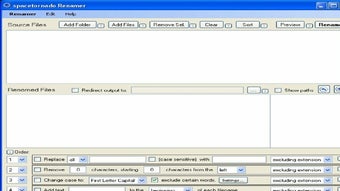
After installation, launch the app from the Start menu or desktop shortcut. The main interface is clean and intuitive, divided into four clearly labeled steps. To start renaming, simply drag and drop your files or folders into the designated area. Alternatively, use the “Add Files” or “Add Folder” buttons. Once your files are loaded, begin customizing the renaming rules. In Step 1, enter the text you want to replace and the replacement text. In Step 2, specify characters to remove. Step 3 lets you choose case formatting, and Step 4 allows you to insert text at the beginning, end, or middle of the filename. Use the preview pane to verify changes before confirming. Click “Rename” to apply the modifications. The software will process files quickly and notify you when complete. For added safety, it automatically creates a backup of original files before renaming—ideal for sensitive projects.
Compatibility and System Requirements
Space Tornado Renamer is designed for maximum accessibility and works across multiple platforms. It is fully compatible with Windows 7, 8, 10, and 11, both 32-bit and 64-bit versions. For Mac users, a native macOS version is available, supporting macOS Mojave (10.14) and later. Mobile users can access a lightweight Android and iOS version via the official app store, perfect for renaming files on the go. The software is optimized to run efficiently on devices with minimal RAM (as low as 2GB) and requires only 50MB of free disk space. It doesn’t require internet access after installation, ensuring privacy and security during use.
One of the key advantages of Space Tornado Renamer is its cross-platform consistency. Whether you're working on a desktop, laptop, or mobile device, the interface and features remain the same, allowing seamless transitions between devices. The mobile apps support touch gestures and offer simplified renaming modes for quick edits. The software updates regularly to fix bugs, improve performance, and add new features—users are notified automatically when a new version is available. All downloads are verified for malware and viruses, ensuring a secure experience. Whether you're a student, professional, or casual user, Space Tornado Renamer delivers reliable performance across all major operating systems.
Pros and Cons of Space Tornado Renamer
- Pros:
- Free to download and use with no hidden fees
- Powerful four-step renaming workflow with full customization
- Real-time preview prevents accidental renaming errors
- Supports drag-and-drop for fast file loading
- Undo function for safe, reversible changes
- Available for Windows, Mac, Android, and iOS
- Lightweight and fast, even on older systems
- Automatic backup of original files before renaming
- Cons:
- Mobile versions lack advanced features compared to desktop
- No built-in batch rename for file extensions (limited to names only)
- Advanced regex support not available in free version
- Interface, while clean, may feel basic to power users
- Limited customer support outside of FAQs and forums
Frequently Asked Questions (FAQ)
- Is Space Tornado Renamer free to download?
Yes, Space Tornado Renamer is completely free to download and use. There are no trial periods or subscription fees. All core features are available without cost, making it accessible for students, professionals, and casual users alike.
- Can I undo a renaming operation?
Absolutely. The software includes an undo function that allows you to revert changes to your files. It also automatically creates a backup of original files before renaming, so you can restore them if needed.
- Does it work on Mac and mobile devices?
Yes, Space Tornado Renamer is available for macOS (10.14 and later), Android, and iOS. The mobile versions offer simplified renaming tools, perfect for quick edits on the go.
- Can I rename file extensions with this tool?
No, Space Tornado Renamer only modifies file names, not extensions. If you need to change file extensions, consider using a dedicated file manager or script.
- How often does the software update?
Updates are released regularly—typically every 4 to 6 weeks—to fix bugs, improve performance, and add new features. Users are notified automatically when a new version is available.
Conclusion: Why You Should Download Space Tornado Renamer Today
If you're tired of manually renaming dozens or even hundreds of files, Space Tornado Renamer is the ultimate solution. This free, secure, and reliable tool delivers powerful bulk renaming capabilities across Windows, Mac, Android, and iOS. With its intuitive four-step workflow, real-time preview, and undo feature, it ensures accuracy and peace of mind. Whether you're organizing a photo album, standardizing project files, or preparing documents for submission, this software saves time and reduces errors.
Best of all, it’s completely free to download and update, with no hidden costs. Its lightweight design ensures smooth performance on any device, and the automatic backup system adds an extra layer of security. For anyone looking to streamline file management, Space Tornado Renamer is a must-have tool. Don’t waste time on repetitive tasks—download it now and transform the way you manage your digital files.
CTA: Download Space Tornado Renamer Free Today and start organizing your files in seconds.
Guides & Tutorials for Space Tornado Renamer
How to install Space Tornado Renamer
- Click the Preview / Download button above.
- Once redirected, accept the terms and click Install.
- Wait for the Space Tornado Renamer download to finish on your device.
How to use Space Tornado Renamer
This software is primarily used for its core features described above. Open the app after installation to explore its capabilities.
User Reviews for Space Tornado Renamer 0
No reviews found





